Guides
YouTube Thumbnail Text Placement: Mobile Safe-Zone Checklist
Quick takeaways
What to know before reading
- Treat 2 to 4 words as a GrabThumbs editing heuristic, not an official YouTube limit.
- Keep the key word away from the bottom-right duration badge and confirm the whole frame at feed size.
- Compare no-text, short-hook, and clearer-context versions before choosing one.
Where should YouTube thumbnail text go? Start in calm space that does not cover the subject, keep the key word away from the bottom-right duration badge, and judge the result at feed size rather than on a full-size canvas.
GrabThumbs uses 2 to 4 words as a practical first draft because short phrases are easier to compare at small size. The official YouTube help pages reviewed on 2026-07-18 do not provide a universal word-count rule or one text safe-zone template, so the final decision still depends on the image, title, audience, and surface where the thumbnail appears.
Quick answer
Use this order:
- Decide what the viewer should notice first: face, object, result, or text.
- Put one compact text block in unused space, usually left or upper-middle when the subject allows it.
- Keep the promise-carrying word out of the bottom-right corner.
- Shrink the frame and compare it beside two competing thumbnails.
- Remove the text once. If the image already communicates the promise, the no-text version may be stronger.
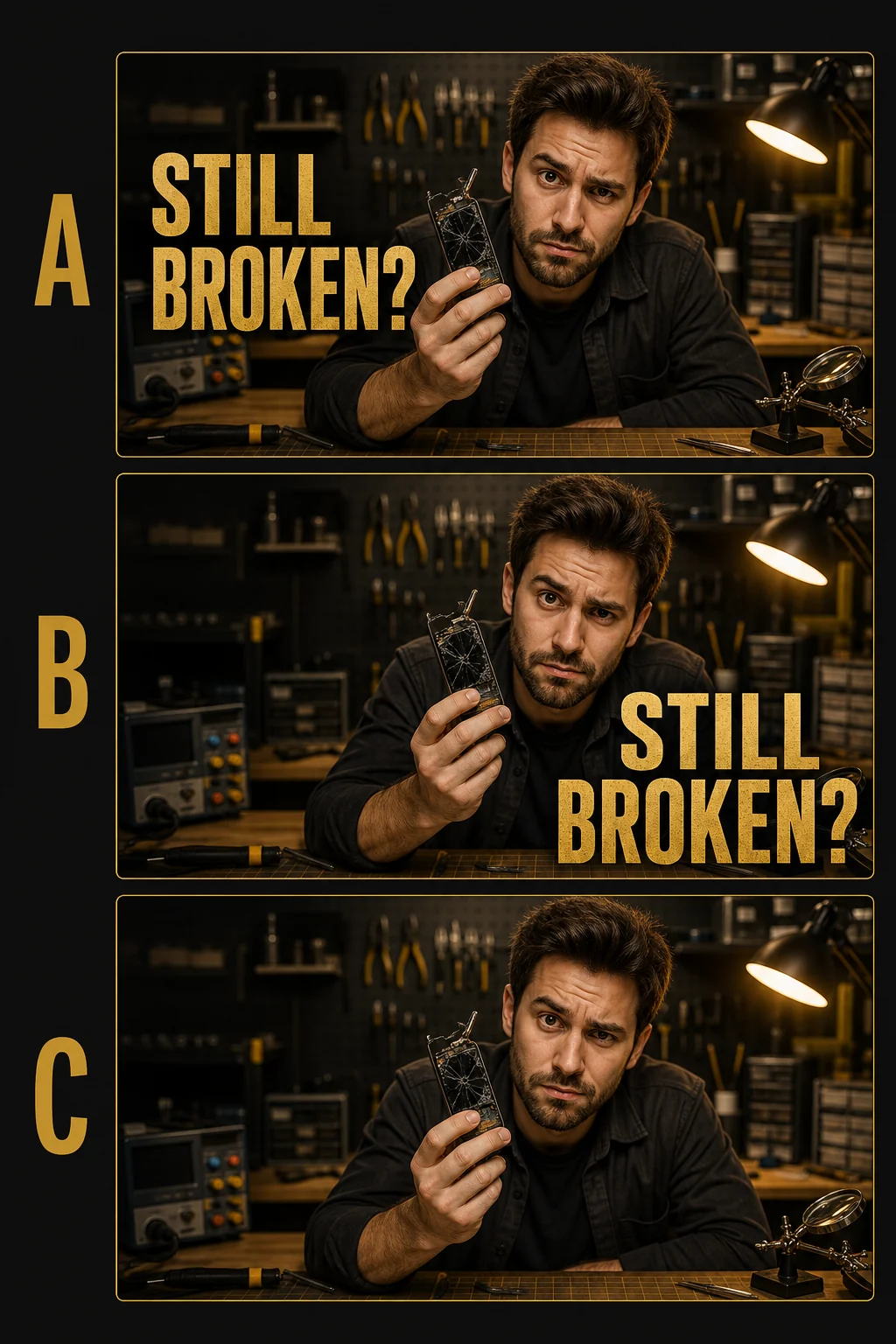
Open the full-size placement comparison
This original GrabThumbs illustration uses closely matched fictional scene variations to make the placement idea visible. It is not a pixel-identical controlled comparison, observed performance evidence, or an official YouTube overlay template. Build real candidates from one frozen source frame, then verify the live preview before publishing because YouTube surfaces change.
Official guidance and GrabThumbs heuristics
It helps to separate platform facts from editing shortcuts.
| Item | What is supported | How to use it |
|---|---|---|
| Image format and size | YouTube recommends a large 16:9 custom thumbnail and publishes current file requirements | Export a clean master, then check the actual upload preview |
| Title and thumbnail accuracy | YouTube says packaging should accurately represent the video | Make sure the first seconds deliver the same promise |
| A/B testing | Eligible creators can test up to three title and thumbnail options in Studio | Use the native test when available instead of declaring a winner from a tiny manual sample |
| 2 to 4 words | GrabThumbs editing heuristic, not a platform rule | Use it as a first draft, then keep only what improves the small-size read |
| Left or upper-middle placement | GrabThumbs safe-zone heuristic, not a fixed template | Use calm space and recheck every composition |
The current YouTube custom-thumbnail guidance is the source of truth for image requirements. The YouTube title and thumbnail A/B test guidance explains which videos are eligible and how results are chosen.
Build one clear reading order
Text placement works only when the frame has a clear first read. Decide the order before styling:
- Subject first: a face, product, screen result, or object carries the meaning; text adds a short tension word.
- Text first: the phrase is the main hook; the image supplies proof or emotion.
- Result first: a before/after or visible outcome leads; text labels what changed.
If the eye must jump between three unrelated text blocks, a face, an arrow, and a bright background, moving the words will not solve the problem. Remove one competing element first.
Compare three versions, not one polished guess
Use the same base image and make three fast candidates.
| Version | What changes | What you learn |
|---|---|---|
| No text | Remove the phrase | Whether the image already explains the promise |
| Short hook | Add one 2-to-4-word phrase | Whether tension or payoff becomes faster to understand |
| Clear context | Add one necessary context word | Whether clarity improves without making the frame slow |
Keep the title stable during this comparison. If the title also changes, you no longer know whether the image or wording changed the first read. Use Thumbnail Text Checker for density, Compare My Thumbnail for side-by-side review, and Thumbnail Test Flow to save the hypothesis before publishing.
Keep the title and thumbnail from repeating each other
The title can explain context. The thumbnail can carry the visible result, emotion, or tension. Repeating the same sentence in both places spends the viewer's attention twice without adding information.
| Title job | Thumbnail-text job |
|---|---|
| Explain what the video covers | Show the payoff or unresolved question |
| Add specificity and searchable context | Stay readable in one glance |
| Set an accurate expectation | Point to visible proof in the image |
YouTube's CTR and impressions guidance also warns against reading CTR without traffic-source and audience context. A more dramatic phrase is not automatically a better package if it attracts the wrong viewer or weakens watch behavior.
Run a mobile-size review
Do not judge readability only at 1280px or 3840px. Reduce the candidate until it resembles a feed card and ask:
- Can the main word be read without zooming?
- Does the duration badge cover any promise-carrying text?
- Does the subject remain recognizable?
- Is the text still one visual block?
- Does the title add new context instead of duplicating the phrase?
Check more than one surface when possible. Search, Home, subscriptions, and suggested-video placements can create different competitive contexts. The goal is not pixel-perfect sameness; it is a stable reading order.
Placement decisions by composition
| Composition | Safer first move | Failure to watch for |
|---|---|---|
| Face or product fills the center | Use available space on the opposite side | Covering the expression or result |
| Important detail sits near the lower right | Move the text up or left | Duration badge hiding the key word |
| Background is busy everywhere | Simplify or add a restrained support shape | Adding outlines until the text becomes another noisy object |
| Two lines are required | Shorten the longer line and keep one alignment | Scattered fragments with no obvious start |
| Vertical or Shorts-related frame | Recheck how the custom image appears on each surface | Assuming one 16:9 preview represents every Shorts surface |
Final pre-publish checklist
- The video, title, and thumbnail make the same accurate promise.
- One element clearly reads first.
- The key word stays clear of the bottom-right duration badge.
- The phrase survives a feed-size review.
- A no-text version was considered.
- Only one main variable changes between candidates.
- The final image follows YouTube's current thumbnail policy and upload requirements.
Sources, review, and change history
This guide distinguishes official platform documentation from GrabThumbs editing heuristics. It was reviewed against:
- YouTube Help: Add custom thumbnails
- YouTube Help: A/B test titles and thumbnails
- YouTube Help: Decode CTR and impressions
- YouTube Help: Thumbnail policy
Change history: On 2026-07-18, GrabThumbs removed repeated placement advice, added an original fictional placement illustration with an explicit non-controlled-evidence limitation, labeled the word-count rule as an editorial heuristic, and refreshed links to current YouTube documentation.
FAQ
Does YouTube require thumbnail text to use 2 to 4 words?
No. That range is a GrabThumbs editing heuristic for creating a fast first draft, not an official YouTube rule.
Is there one official YouTube thumbnail text safe zone?
The official YouTube help pages reviewed on 2026-07-18 do not provide one universal text-placement template. Treat the diagram above as a review aid and confirm the actual preview on the surfaces that matter to your channel.
Should I always avoid the bottom-right corner?
Keep the key word away from it because the duration badge commonly occupies that area. Decorative detail may be less critical, but the promise should remain readable.
Is no text sometimes better?
Yes. If the image already communicates the result or tension, extra words can slow the first read.
What should I test first?
Compare the same image with no text, a short hook, and one slightly clearer phrase. Keep the title and other visual elements stable so the lesson is easier to interpret.
Related guides and tools
Published
2026-03-01
Estimated reading time
7 min
Word count
1,417
Editorial notes
How this guide was prepared
This guide is edited for practical use, clear claims, copyright boundaries, and a direct next step into the relevant tool or policy page.
Written by
GrabThumbs Editorial Team
Reviewed by
GrabThumbs Editorial QA
Review focus
Practical usefulness, clarity of claims, safer reuse boundaries, and stronger links to the next relevant tool or policy page.
Update practice
2026-07-18
The guide is revisited when workflow advice, platform behavior, or policy context changes in a meaningful way.
Corrections or policy questions
Use the contact page if you spot an accuracy, copyright, or policy issue that should be reviewed.
Open contact pageTry the tool
Test this with a real YouTube thumbnail
Paste a public YouTube URL to open available thumbnail sizes, compare readability, copy the direct image URL, or download the image without login.
Open YouTube Thumbnail DownloaderTool loading
The inline thumbnail extractor will load as you approach it
The article loads first, then the public YouTube thumbnail test tool hydrates near this section.
Guide support
How this guide is maintained
This article is part of the GrabThumbs editorial library and links to the site standards, product context, and contact path so readers can verify how the site is run.
Thumbnail Extractor
Open live public YouTube thumbnails right after reading so you can compare the guidance against real examples.
Standards
Review the editorial, corrections, and advertising standards that apply across the site.
About GrabThumbs
See what the site publishes, how the utility works, and how the editorial library fits into the product.
Contact
Use the contact page for policy, copyright, accuracy, or business questions.
Reading path
Continue with the same goal
These guides belong to the same goal-based path as the article you are reading, so you can keep moving through the topic without jumping around the archive.
Use this group when text feels crowded, hard to scan on mobile, or too dependent on long wording.
7 thumbnail text mistakes new YouTubers make all the time
A lot of videos lose the click before the content even gets a chance. These are the text mistakes that do the damage.
Read this guide →
YouTube Thumbnail A/B Testing: A Clean 2026 Workflow
Run a cleaner YouTube thumbnail A/B test: use the current Studio feature when eligible, separate concurrent tests from manual monitoring, and record one clear hypothesis.
Read this guide →
Related guides
Keep reading within the same topic cluster with these related articles.
YouTube CTR Diagnosis: When to Change Your Thumbnail vs Keep It
Use traffic-source context, 48-hour checks, and thumbnail-title promise matching before changing a thumbnail because CTR dropped.
Read this guide →
Can You Reuse YouTube Thumbnails? Copyright Boundaries for Creators
Use a practical copyright-risk checklist for YouTube thumbnail research, reference boards, fair-use questions, and original thumbnail rebuilds.
Read this guide →
Thumbnail planning in the AI era: using Google AI without losing the human eye
Generative AI can speed up thumbnail planning, but it still works best as a thinking partner, not a replacement.
Read this guide →
Time to put theory into practice!
Open competitor thumbnails right away for comparison and analysis.
Go to Thumbnail Extractor