Guides
YouTube Thumbnail Branding: Consistency Checklist for Channels
Quick takeaways
Quick summary
Use a practical YouTube thumbnail branding checklist to keep colors, faces, text, and layout recognizable without making every upload look identical.
Some channels feel recognizable before you even read the name. You see the color palette, the text treatment, the crop style, and you know whose video it is. That is not an accident. That is branding, and on YouTube the thumbnail does a lot of that work.
This matters more than people think. A great one-off thumbnail can win a click. A recognizable system can build a channel.
Quick answer
A consistent thumbnail brand does not mean every upload should look the same. Keep two or three repeatable signals, such as color role, face treatment, text style, layout rhythm, or prop language. Then let the subject, promise, and emotion change per video.
Before publishing, review the last 12 uploads, then use Compare My Thumbnail, the Thumbnail Text Checker, and the YouTube Title Checker to separate recognition from readability.
Why consistency gets remembered faster
In the feed, viewers do not always read carefully. They react to shapes, faces, color, contrast, and structure first. If your thumbnails keep changing visual language, every new video has to introduce itself from scratch.
A consistent thumbnail system shortens that distance. It helps the viewer feel, "I know this channel," before they process the rest.
Consistency is not a template
The biggest mistake is treating branding as one locked design. A fixed template can help for a series, but a whole channel needs more flexibility than that.
Think in layers:
- Recognition layer: the few signals that say "this belongs to us"
- Topic layer: the subject, object, or conflict specific to the video
- Click layer: the emotional or informational reason to care right now
If the recognition layer takes over everything, videos blur together. If it disappears, the channel feels random.
What should stay fixed
Consistency means a few core pieces stay stable enough that the whole channel feels related.
1. Color role
You do not need one fixed color forever. What matters is a recognizable visual temperature. Some channels feel bright and playful. Others feel clean and restrained. A channel can also define roles: one color for risk, one for proof, one for the subject.
2. Typography
If the font style changes completely from video to video, the voice of the channel changes with it. Keep one or two core type styles, then vary size, emphasis, and line breaks by topic.
3. Crop logic
Maybe faces are always close and expressive. Maybe product shots are always clean and centered. Maybe the subject sits left while the consequence sits right. The rule does not have to be obvious, but it should be repeatable.
4. Text density
Some channels work best with one or two large words. Others need a short phrase. Pick a normal text range so every upload does not restart the readability decision.
5. One controlled surprise
Every thumbnail still needs a reason to exist. The surprise might be a new prop, unusual color accent, different expression, or stronger contrast point. Keep the brand stable, then vary one thing on purpose.
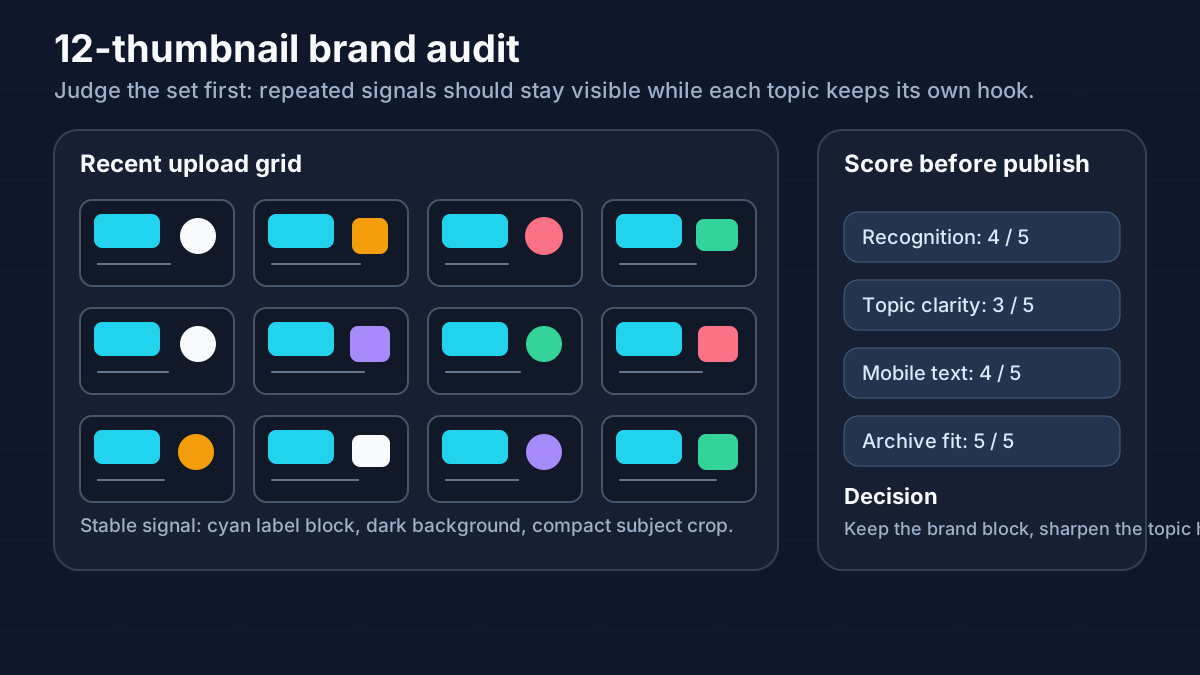
A 12-thumbnail audit
Open your last 12 uploads in one view. Do not start by judging the newest thumbnail alone. Judge the set.
Use this audit:
| Question | Good sign | Warning sign |
|---|---|---|
| Do they belong to one channel? | Repeated color, type, crop, or subject logic | Every upload feels like a different creator |
| Can viewers tell topics apart? | Each thumbnail has a distinct hook | Several uploads feel interchangeable |
| Is the brand readable at small size? | The strongest signal survives mobile scale | The system only works when viewed large |
| Does the newest thumbnail fit? | It adds variation without breaking identity | It either clones the old set or abandons it |
This audit is more useful than asking whether one thumbnail "looks nice." Branding is a system problem.
Turn the system into simple operating rules
Write the rules so a future thumbnail can inherit them quickly.
Example lightweight system:
- Palette: dark background, one warm accent, one cool support color
- Face treatment: close crop, eyes visible, no more than one strong emotion
- Text: one to five words, heavy weight, no more than two lines
- Layout: subject left, consequence or proof right
- Break rule: one major launch can use a brighter background if the type and crop remain recognizable
That is enough structure to keep the channel coherent without freezing creativity.
Score each thumbnail before publishing
Use a five-point scorecard:
- Recognition: would a returning viewer know the channel before reading the name?
- Topic clarity: would a new viewer understand what this video is about?
- Difference: does this video have one distinct visual hook?
- Readability: does the text still work on mobile?
- Archive fit: does the thumbnail strengthen the last 12 uploads as a set?
If recognition is high but topic clarity is weak, the thumbnail may be over-branded. If topic clarity is high but recognition is weak, the thumbnail may win a single click while weakening the channel system.
When to break the pattern
Strong branding systems need a rule for when not to follow themselves too rigidly. Special uploads often deserve more room:
- major announcements
- milestone videos
- unusual collaborations
- breakout topics
- a series finale or reset
Even then, keep one layer stable. You might change the background but keep the typography. You might change the facial crop but keep the color role. The viewer should feel something is special without feeling they landed on a different channel.
Compare recognition against topic clarity
A thumbnail can be perfectly on-brand and still underperform if the topic gets buried. During review, ask two separate questions:
- Would a returning viewer recognize the channel quickly?
- Would a new viewer understand why this specific video matters?
The second question is the one many branding-focused channels miss. If recognition is good but the topic promise is weak, review the wording with the Thumbnail Text Checker or the title with the YouTube Title Checker.
Example: a channel system without cloning
Imagine a tech channel with these rules:
- navy or charcoal background
- one neon accent
- presenter face in a clean crop
- one large product or UI element
- two-line maximum text
That system can still support very different videos:
- product review: face plus product angle
- tutorial: UI crop plus outcome text
- news reaction: stronger expression plus headline keyword
- comparison: two product objects and one contrast label
The thumbnails feel related because the color, crop, and text logic stay consistent. They do not feel cloned because the subject and click reason change.
FAQ
Should every thumbnail use the exact same template?
Usually no. Recognition matters, but each upload still needs enough variation to feel worth clicking.
What should stay fixed first?
Start with the most noticeable patterns: color temperature, typography style, and one basic crop or layout rule.
How do I know when consistency has become too repetitive?
If different videos start feeling interchangeable at small size, the system may be too rigid. Recognition should come before repetition.
Does consistency help only with branding?
No. It can also make the channel look more deliberate and trustworthy when viewers, subscribers, collaborators, or sponsors review the archive.
How do I keep special uploads from looking disconnected?
Keep one recognizable layer stable even when the concept changes. That might be the same color role, crop logic, or type treatment.
Related guides
Published
2026-02-25
Estimated reading time
6 min
Word count
1,288
Editorial notes
How this guide was prepared
This guide is edited for practical use, clear claims, copyright boundaries, and a direct next step into the relevant tool or policy page.
Written by
GrabThumbs Editorial Team
Reviewed by
GrabThumbs Editorial Team
Review focus
Practical usefulness, clarity of claims, safer reuse boundaries, and stronger links to the next relevant tool or policy page.
Update practice
2026-02-25
The guide is revisited when workflow advice, platform behavior, or policy context changes in a meaningful way.
Corrections or policy questions
Use the contact page if you spot an accuracy, copyright, or policy issue that should be reviewed.
Open contact pageTry the tool
Test this with a real YouTube thumbnail
Paste a public YouTube URL to open available thumbnail sizes, compare readability, copy the direct image URL, or download the image without login.
Open YouTube Thumbnail DownloaderTool loading
The inline thumbnail extractor will load as you approach it
The article loads first, then the public YouTube thumbnail test tool hydrates near this section.
Guide support
How this guide is maintained
This article is part of the GrabThumbs editorial library and links to the site standards, product context, and contact path so readers can verify how the site is run.
Thumbnail Extractor
Open live public YouTube thumbnails right after reading so you can compare the guidance against real examples.
Standards
Review the editorial, corrections, and advertising standards that apply across the site.
About GrabThumbs
See what the site publishes, how the utility works, and how the editorial library fits into the product.
Contact
Use the contact page for policy, copyright, accuracy, or business questions.
Reading path
Continue with the same goal
These guides belong to the same goal-based path as the article you are reading, so you can keep moving through the topic without jumping around the archive.
Open these when you want practical systems for reference gathering, A/B testing, and keeping channel packaging consistent.
5 times downloading a YouTube thumbnail actually matters
From competitor research to archiving, these are the moments when having the original thumbnail file genuinely helps.
Read this guide →
YouTube Thumbnail A/B Testing: A Clean 2026 Workflow
Run a cleaner YouTube thumbnail A/B test: use the current Studio feature when eligible, separate concurrent tests from manual monitoring, and record one clear hypothesis.
Read this guide →
Related guides
Keep reading within the same topic cluster with these related articles.
YouTube CTR Diagnosis: When to Change Your Thumbnail vs Keep It
Use traffic-source context, 48-hour checks, and thumbnail-title promise matching before changing a thumbnail because CTR dropped.
Read this guide →
Can You Reuse YouTube Thumbnails? Copyright Boundaries for Creators
Use a practical copyright-risk checklist for YouTube thumbnail research, reference boards, fair-use questions, and original thumbnail rebuilds.
Read this guide →
Thumbnail planning in the AI era: using Google AI without losing the human eye
Generative AI can speed up thumbnail planning, but it still works best as a thinking partner, not a replacement.
Read this guide →
Time to put theory into practice!
Open competitor thumbnails right away for comparison and analysis.
Go to Thumbnail Extractor