Guides
YouTube Thumbnail Color Combinations: Contrast Examples for 2026
Quick takeaways
Quick summary
Use practical YouTube thumbnail color examples to keep subjects readable, separate foreground from background, and avoid palettes that disappear in the feed.
When people talk about thumbnail colors, the conversation often jumps straight to "best-performing palettes" and color psychology. Both can be useful. But the first question is more practical: can the viewer actually separate the important parts of the image at a glance?
Color matters, but it matters inside the feed, not inside a mood board.
Quick answer
- Best default: give the thumbnail one primary color, one support color, and one restraint color.
- Avoid: using saturated colors everywhere, especially when the foreground, background, text, and skin tones all compete for first attention.
- Use this when: the subject needs stronger separation from the background or the channel palette is starting to disappear in the feed.
- Test before publishing: compare the frame in light and dark YouTube contexts, then use Compare My Thumbnail to check whether the focal point still wins at feed size. If the text also needs cleanup, pair this with the thumbnail text placement guide.
Best colors for YouTube thumbnails are the colors that stay readable
The best colors for YouTube thumbnails are not universal magic colors. They are the colors that keep the subject, text, and emotional cue readable when the image is reduced inside the feed.
Before worrying about whether a color feels bold, calm, playful, or premium, check whether the subject and text separate clearly from the background. A beautiful palette with weak contrast still fails at thumbnail size.
That is why brightness contrast is usually more important than "the perfect color" on its own.
Color psychology in YouTube thumbnails: useful, but secondary to contrast
Color psychology can help you choose a mood: warmer accents can feel urgent, cooler backgrounds can feel calmer, and darker palettes can support mystery or analysis. But mood does not matter if the viewer cannot identify the subject quickly.
Use psychology after the practical checks. First ask whether the face, object, or text reads instantly. Then ask whether the color temperature supports the promise of the video.
Color vs colour: same problem, same checklist
Some creators search for "color combinations" and others search for "colour combinations." The spelling changes, but the thumbnail problem is the same.
Use the same checklist either way: enough contrast, one clear focal priority, readable text, and a palette that still separates from YouTube's light and dark surfaces.
2. The YouTube interface is part of the color problem
YouTube already has strong environmental colors: white in light mode, dark grays in dark mode, and red as a platform accent. If a thumbnail leans too heavily into those same tones without enough separation, it can visually blend into the interface.
This does not mean you can never use white, black, or red. It just means you need to check whether the thumbnail still feels distinct from the platform around it.
3. A few combinations are reliable for a reason
Some combinations keep showing up because they are dependable:
Blue background + yellow or orange accent
This is one of the most reliable combinations for readability and energy.
Teal or green background + warm skin tones or orange accents
This often works well when faces are central to the frame.
Deep purple or navy background + bright neutral or neon accent
This combination appears often in knowledge-heavy, mystery, or review-style channels because it can feel distinct without becoming unreadable.
4. Your channel still needs its own version
There is no single correct palette for every channel. Gaming, personal finance, robotics, beauty, and commentary channels do not all benefit from the same visual temperature.
That is why it helps to work with a small set of repeatable color directions instead of changing everything at random. Patterns become easier to test, and consistency gets easier to maintain.
In the end, the strongest thumbnail colors are usually not the most dramatic ones. They are the ones that keep the subject readable, the message clear, and the channel recognizable at a glance.
That is a much better standard than simply chasing a supposed performance palette.
How to test color combinations without guessing
Start by defining the single element that needs to win the viewer's attention first. Then test whether the background, text, and focal object still separate clearly at mobile size. When you compare two versions, change one color relationship at a time so you can tell whether the improvement came from contrast, readability, or emotional tone.
Example: choosing between two common thumbnail palettes
If one version uses bright yellow text on a white background and another uses the same yellow text on a deep blue field, the second option usually reads faster because the contrast does more work. The better palette is not the one with more colors. It is the one that lets the most important idea stay visible in the feed.
Build a small palette system instead of chasing random color ideas
Most channels do not need endless color experimentation. A much more useful approach is to define two or three repeatable directions:
- one high-energy palette
- one cleaner, calmer palette
- one fallback palette for text-heavy or educational videos
That keeps thumbnails recognizable while still giving you room to adapt by topic.
Check color with the subject, not in isolation
Color decisions are often made too early on empty backgrounds. In the real thumbnail, the subject, face, product, or text block changes everything.
A palette that looks strong on its own can become weak once skin tones, interface colors, and background noise are added. That is why the only reliable test is the full thumbnail at small size.
Good color choices usually support one focal priority
The best combinations help the viewer answer one question immediately: what should I notice first?
- the face
- the object
- the before-and-after contrast
- the short text hook
If every color is equally loud, nothing feels important. For channels that want to connect color choices to broader brand consistency, Thumbnail consistency is what makes channel branding stick is the best companion guide.
YouTube thumbnail color combinations that work in light and dark mode
Color combinations do not live on a blank canvas. They live inside YouTube's interface. A thumbnail that feels distinct in a dark editor preview can soften too much on a white background, and a pale combination that feels clean in light mode can disappear in dark mode.
Before you export, check the thumbnail against both light and dark surroundings at small size. If the subject or text only feels clear in one environment, the color system still needs work.
Match the palette to the content job, not just the mood
Color becomes easier to choose when you define what the thumbnail needs to do first.
- use stronger warm-versus-cool contrast when the goal is urgency or surprise
- use cleaner, restrained contrast when the goal is trust, clarity, or explanation
- use one repeatable accent when the channel needs easier recognition across multiple uploads
That keeps color tied to communication instead of making it a disconnected decoration layer.
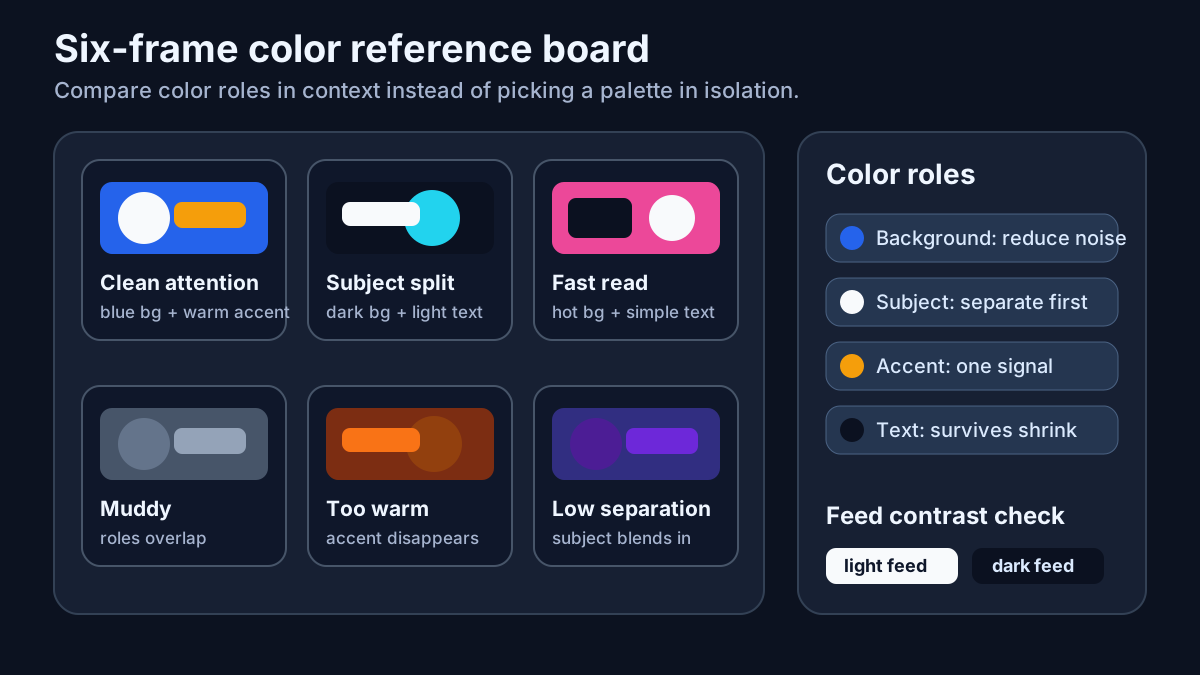
Build a six-frame color reference board from your niche
Color choices stop feeling mystical when you compare real thumbnails in context. Capture six examples from the same niche:
- three thumbnails that attract attention cleanly
- three thumbnails that feel muddy, repetitive, or easy to skip
Then review them at feed size and write notes on only four things:
- what element wins first attention
- whether the background fights the subject
- whether the accent color survives against YouTube's interface
- whether text and skin tones stay readable together
That review usually tells you more than a color-wheel discussion. It becomes obvious that the winning palette is often the one with better focal separation, not the one with the most dramatic theory behind it.
Use one primary color, one support color, and one restraint color
Many thumbnails look noisy because every color is trying to be the star. A more stable rule is:
- primary color: sets the overall temperature
- support color: highlights the face, object, or text
- restraint color: keeps the background or secondary detail under control
This works because it forces you to decide what should stay loud and what should stay quiet. If the accent color appears everywhere, it stops behaving like an accent. If the background is too colorful, the subject has to fight harder than it should.
For most channels, this simple color hierarchy is easier to maintain than chasing a brand-new palette for every upload.
Copy this palette review worksheet
When color decisions start to feel subjective, use one repeatable review sheet instead of arguing from taste:
Video or series:
Primary color:
Support color:
Restraint color:

What should the viewer notice first?
Does the subject still separate from the background? yes / no
Does the text still read on mobile? yes / no / no text used
Does this palette still work in YouTube dark mode? yes / no
Does this palette still fit the series identity? yes / no

If the palette feels weak, change:
- contrast
- crop size
- text amount
- background clutter
This helps you avoid blaming the palette when the real problem is often hierarchy, readability, or a subject that is too small.
Before-and-after example: a palette reset for a review thumbnail
When creators say the colors feel weak, the fix is often less dramatic than they expect:
Before
- bright green background
- red text and blue accent at the same time
- product shot and face both competing for attention

After
- deep navy background
- warm orange accent on the product highlight
- skin tone and text kept brighter than the background
- one muted gray area used to calm the extra details

Why it improved
- the product became the first read
- the accent color stopped fighting with everything else
- the frame looked cleaner on both light and dark YouTube surfaces
The lesson is not "always use navy and orange." The lesson is that color usually works better when one role gets louder and the rest step back.
FAQ
Should I always use complementary colors?
Not always. Complementary pairs can create strong contrast, but they only help if the thumbnail still feels readable and controlled.
Is more saturation always better?
No. Oversaturation can flatten the image and make everything compete at once. The goal is focus, not noise.
What should I check before finalizing thumbnail colors?
Check the thumbnail at small size, compare it against YouTube's interface, and make sure the subject still separates from the background instantly.
Should every series on my channel use the same colors?
Not exactly, but the strongest channels usually work from a small repeatable range. That gives you enough flexibility for different topics while still making the channel feel visually familiar.
Related guides
- 3 fundamentals that make YouTube thumbnails easier to click
- Thumbnail design trends in 2026: what keeps showing up in the feed
- YouTube thumbnail text placement: mobile safe zones and timestamp avoidance
- How thumbnail design changes when your audience changes
- Thumbnail consistency is what makes channel branding stick
- Compare My Thumbnail
- Open the GrabThumbs thumbnail extractor
Published
2026-03-01
Estimated reading time
9 min
Word count
1,846
Editorial notes
How this guide was prepared
This guide is edited for practical use, clear claims, copyright boundaries, and a direct next step into the relevant tool or policy page.
Written by
GrabThumbs Editorial Team
Reviewed by
GrabThumbs Editorial Team
Review focus
Practical usefulness, clarity of claims, safer reuse boundaries, and stronger links to the next relevant tool or policy page.
Update practice
2026-03-01
The guide is revisited when workflow advice, platform behavior, or policy context changes in a meaningful way.
Corrections or policy questions
Use the contact page if you spot an accuracy, copyright, or policy issue that should be reviewed.
Open contact pageTry the tool
Test this with a real YouTube thumbnail
Paste a public YouTube URL to open available thumbnail sizes, compare readability, copy the direct image URL, or download the image without login.
Open YouTube Thumbnail DownloaderTool loading
The inline thumbnail extractor will load as you approach it
The article loads first, then the public YouTube thumbnail test tool hydrates near this section.
Guide support
How this guide is maintained
This article is part of the GrabThumbs editorial library and links to the site standards, product context, and contact path so readers can verify how the site is run.
Thumbnail Extractor
Open live public YouTube thumbnails right after reading so you can compare the guidance against real examples.
Standards
Review the editorial, corrections, and advertising standards that apply across the site.
About GrabThumbs
See what the site publishes, how the utility works, and how the editorial library fits into the product.
Contact
Use the contact page for policy, copyright, accuracy, or business questions.
Reading path
Continue with the same goal
These guides belong to the same goal-based path as the article you are reading, so you can keep moving through the topic without jumping around the archive.
Color, audience fit, and design trends belong here when you want stronger visual packaging decisions.
How thumbnail design changes when your audience changes
Different age groups often respond to different levels of visual density, but your own audience data should lead the way.
Read this guide →
YouTube Thumbnail Trends 2026: Run a Category Audit
Use a repeatable category audit to study YouTube thumbnail patterns in 2026 without copying a universal trend list or changing every design variable at once.
Read this guide →
Related guides
Keep reading within the same topic cluster with these related articles.
YouTube CTR Diagnosis: When to Change Your Thumbnail vs Keep It
Use traffic-source context, 48-hour checks, and thumbnail-title promise matching before changing a thumbnail because CTR dropped.
Read this guide →
Can You Reuse YouTube Thumbnails? Copyright Boundaries for Creators
Use a practical copyright-risk checklist for YouTube thumbnail research, reference boards, fair-use questions, and original thumbnail rebuilds.
Read this guide →
Thumbnail planning in the AI era: using Google AI without losing the human eye
Generative AI can speed up thumbnail planning, but it still works best as a thinking partner, not a replacement.
Read this guide →
Time to put theory into practice!
Open competitor thumbnails right away for comparison and analysis.
Go to Thumbnail Extractor