Guides
3 fundamentals that make YouTube thumbnails easier to click
Quick takeaways
Quick summary
A lot of thumbnail improvement comes from boring basics done well: contrast, compression, and a clear emotional cue.
When a video underperforms, people often start by blaming timing, reach, or the algorithm. Sometimes that is fair. But a surprising number of videos are being hurt by something much simpler: the thumbnail never gave people a reason to stop.
Before chasing advanced tricks, it is worth checking three basics.
1. Make the subject easy to separate: contrast
The first job of a thumbnail is not to be pretty. It is to be legible at speed. If the subject blends into the background, the viewer has to work too hard before the click even happens.
Contrast solves that. Sometimes it means stronger color contrast. Sometimes it is simply a better brightness difference between foreground and background. Either way, the goal is the same: the main subject should announce itself immediately.
2. Compress the message instead of explaining it
The second job of a thumbnail is to create one clean question in the viewer's mind. That is hard to do if the image is trying to explain the whole video at once.
Strong thumbnails usually leave one idea behind, not five. A shift, a surprise, a tension point, a clear result. The tighter the message, the easier it is to process.
If text is needed, keep it short enough that it functions like a hook rather than a summary.
3. If you show a face, make the emotion readable
Faces still work, but not because faces are magic. They work when the emotion is unmistakable. Surprise, frustration, relief, disbelief, focus. Those reactions tell the viewer where the emotional center of the video lives.
Not every thumbnail needs a face. Some topics are better served by an object, a before-and-after, or a result screen. But if you do use a face, make sure it reads at small size.
In the end, a clickable thumbnail is usually not the one doing the most. It is the one doing the basic things clearly: separating the subject, compressing the message, and making the emotional cue obvious.
A fast thumbnail check before you publish
Shrink the thumbnail to feed size before you approve it. If the subject disappears, the contrast is too weak. If the image seems to explain three ideas at once, the message needs to be compressed further. If the face or focal object is still unclear at a glance, simplify until one reaction or one result becomes obvious.
Example: fixing a weak thumbnail without redesigning everything
Imagine a tutorial thumbnail that includes a laptop screenshot, a face, three words of text, and a busy background. You may not need a full redesign. A tighter crop on the face, darker background treatment, and shorter text can often make the same concept much easier to click.
What to check when CTR is weak but impressions are healthy
If YouTube is still giving the video impressions, the packaging is usually the first place to investigate. Ask:
- is the main subject readable at feed size?
- is the thumbnail trying to communicate more than one idea?
- does the title add context or just repeat the thumbnail?
- would a new viewer understand the emotional stakes in under a second?
Those questions often surface the real problem faster than chasing abstract "algorithm" theories.
Small changes that often lift click quality
Creators sometimes think improvement requires a full redesign. In practice, a few smaller changes often matter more:
- darken or simplify the background
- enlarge the focal subject
- remove one non-essential text fragment
- make the emotional cue more readable
Those changes are boring, but boring fixes are often the ones that improve CTR.
A simple test order when you cannot redesign everything
If you only have time to make one pass before the next upload, use this order:
- check whether the subject is still readable when the thumbnail is viewed small
- remove one extra visual element before adding anything new
- shorten the text if the image can already carry part of the idea
- compare the thumbnail against the title and ask whether both are doing different jobs
That sequence helps you fix the most common clarity problems first instead of jumping straight into style changes.
Use live references before blaming the algorithm
A quick way to stay honest is to open your own recent thumbnails and a few competing examples side by side at feed size. If your idea only looks strong at editor size, the problem is usually packaging clarity rather than reach itself. That is also why this guide pairs well with the YouTube Title Checker and the GrabThumbs thumbnail extractor: one helps you tighten the text promise, and the other lets you compare the visual promise against real published examples.
CTR gains matter more when the promise stays accurate
The goal is not to create a more clickable lie. The goal is to make the right viewer feel that the video is worth starting. If the click rises but the audience leaves faster, the packaging may have become louder rather than clearer.
That is why this guide pairs well with Thumbnail A/B testing: why data beats taste and The YouTube algorithm in 2026: the signals that shape reach.
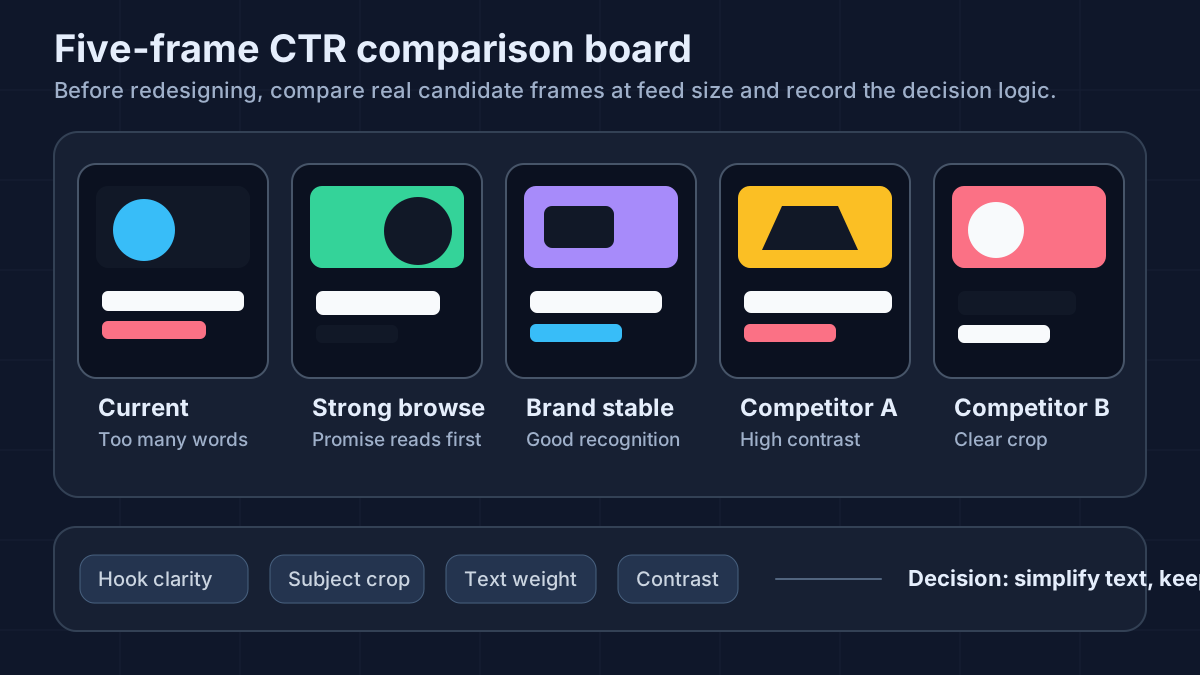
Build one five-capture comparison board before you redesign
Before you redesign from memory, capture five real frames:
- your current thumbnail
- one recent thumbnail that got strong browse traffic
- one older thumbnail that still represents the channel well
- two competing thumbnails covering a similar promise
Place them side by side at phone size and write quick notes under each one:
- can you name the subject in two words?
- how many words survive the reduction?
- what emotion or result reads first?
- which background is easiest to ignore?
This is a small habit, but it makes the review feel less abstract. Instead of saying "this one looks weak," you can usually point to a concrete issue like a smaller face crop, muddier contrast, or a title-thumbnail pair that repeats the same promise twice.
Use one publish-day checklist before you approve the final frame
If the video is already scheduled and you do not have time for a full redesign, run one short approval pass anyway:
- open the thumbnail at roughly 10 to 15 percent size
- compare the thumbnail against the final title
- remove one extra visual element before adding anything new
- check whether the frame still works if the text disappears
- save one rejected alternate in case the live version needs a later test
That last step matters. A lot of creators discover the right second version only after the video is live. Keeping one simpler fallback gives you a cleaner starting point for a future A/B test instead of forcing you to redesign under pressure.
Copy this 60-second CTR diagnosis sheet
If you want one practical review artifact instead of another vague reminder, copy this into Notes, Notion, or a spreadsheet before you touch the thumbnail:
Video:
Main traffic source:
Current title promise:
Current thumbnail promise:

Phone-size subject still obvious? yes / no
Thumbnail text still readable? yes / no / not needed
Title and thumbnail doing different jobs? yes / no
Biggest distraction in the frame:
One element to remove first:
One alternate version to save:

Diagnosis:
- likely packaging issue / likely topic issue / likely opening issue
- next change to test:
This is intentionally short. The point is to force one clear diagnosis before you start changing multiple things at once.
Before-and-after example: one tutorial thumbnail cleanup
Here is the kind of change that often improves CTR without changing the video promise itself:
Before
- wide laptop screenshot
- small face in one corner
- text: "Python automation tutorial"
- dark background with low separation

After
- tighter face crop with obvious frustration
- screenshot pushed into the background as context only
- text reduced to: "Finally Works"
- brighter subject edge against a quieter background

Why it improved
- the viewer now reads one emotion first
- the title can carry the tutorial context
- the thumbnail stops trying to explain the whole video
This is not a magic formula. It is a reminder that a better result often comes from stronger hierarchy, not a completely different idea.
FAQ
Is CTR mostly about bold colors?
No. Color helps, but only when it improves legibility and focus. Strong contrast matters more than random brightness.
Should every thumbnail have text?
No. Text is only useful when it sharpens the idea. If the image already communicates clearly, extra words can make the thumbnail weaker.
Are faces required for high CTR?
Not always. Faces work when emotion is readable, but some topics perform better with a product, result screen, or before-and-after comparison.
What should I check first if CTR drops after a title or thumbnail change?
Start with first-read clarity, not style preferences. Open the current thumbnail at small size, compare it with the title, and check whether one asset already explains the idea clearly while the other adds new context. A lot of CTR drops come from packaging overlap or a weaker promise, not from the upload time itself.
Related guides
Published
2026-03-03
Estimated reading time
8 min
Word count
1,560
Editorial notes
How this guide was prepared
This guide is edited for practical use, clear claims, copyright boundaries, and a direct next step into the relevant tool or policy page.
Written by
GrabThumbs Editorial Team
Reviewed by
GrabThumbs Editorial Team
Review focus
Practical usefulness, clarity of claims, safer reuse boundaries, and stronger links to the next relevant tool or policy page.
Update practice
2026-03-03
The guide is revisited when workflow advice, platform behavior, or policy context changes in a meaningful way.
Corrections or policy questions
Use the contact page if you spot an accuracy, copyright, or policy issue that should be reviewed.
Open contact pageTry the tool
Test this with a real YouTube thumbnail
Paste a public YouTube URL to open available thumbnail sizes, compare readability, copy the direct image URL, or download the image without login.
Open YouTube Thumbnail DownloaderTool loading
The inline thumbnail extractor will load as you approach it
The article loads first, then the public YouTube thumbnail test tool hydrates near this section.
Guide support
How this guide is maintained
This article is part of the GrabThumbs editorial library and links to the site standards, product context, and contact path so readers can verify how the site is run.
Thumbnail Extractor
Open live public YouTube thumbnails right after reading so you can compare the guidance against real examples.
Standards
Review the editorial, corrections, and advertising standards that apply across the site.
About GrabThumbs
See what the site publishes, how the utility works, and how the editorial library fits into the product.
Contact
Use the contact page for policy, copyright, accuracy, or business questions.
Reading path
Continue with the same goal
These guides belong to the same goal-based path as the article you are reading, so you can keep moving through the topic without jumping around the archive.
Start here when you need the broadest explanation of click quality, reach signals, and what actually improves thumbnail CTR.
YouTube CTR Diagnosis: When to Change Your Thumbnail vs Keep It
Use traffic-source context, 48-hour checks, and thumbnail-title promise matching before changing a thumbnail because CTR dropped.
Read this guide →
YouTube Algorithm 2026: CTR, Watch Behavior, and Thumbnail Packaging
Understand how YouTube evaluates thumbnails, titles, CTR, watch behavior, and viewer satisfaction before you change your video packaging.
Read this guide →
Related guides
Keep reading within the same topic cluster with these related articles.
Can You Reuse YouTube Thumbnails? Copyright Boundaries for Creators
Use a practical copyright-risk checklist for YouTube thumbnail research, reference boards, fair-use questions, and original thumbnail rebuilds.
Read this guide →
Thumbnail planning in the AI era: using Google AI without losing the human eye
Generative AI can speed up thumbnail planning, but it still works best as a thinking partner, not a replacement.
Read this guide →
YouTube Thumbnail A/B Testing: A Clean 2026 Workflow
Run a cleaner YouTube thumbnail A/B test: use the current Studio feature when eligible, separate concurrent tests from manual monitoring, and record one clear hypothesis.
Read this guide →
Time to put theory into practice!
Open competitor thumbnails right away for comparison and analysis.
Go to Thumbnail Extractor